Subscribe Our Channel

header ads

Search This Blog

Showing posts with label C. Show all posts

Friday, March 27, 2026

C++ Program to Create C++ Project to do Sunflower field with sky, cloud and sun

C++ Program to Create C++ Project to do Sunflower field with sky, cloud and sun

HELLO VIEWERS YOU MIGHT BE INTERESTED IN THIS POST.

Your welcome to our website COMPUTER SOFT SKILLS, after reading this article you can make this in just 2 minutes.
THIS IS A C++ PROGRAMMING TO CREATE Project Sunflower field with middle road, cloud, sun and birds

Beautiful Project using C++ Graphics.

YOU CAN COPY THIS CODE AND SAVE IN YOUR SYSTEM.
This Programming created by Rohit, owner of Computer Soft Skills. Yes you read it right! You can make that type of Project easily in C++ application.

//_____/_____ WELCOME ALL OF YOU ON ROHIT TECH STUDY CHANNEL _____\________//

//-------- C++ PROGRAM TO CREATE SUNFLOWER FIELD WITH ROAD --------------\\
/*________________________________________________________________________*/

#include <graphics.h>
#include <conio.h>
#include <math.h>
#include <dos.h>
#include <stdlib.h>
#include <time.h>

// Function to draw sunflower with variable size
void drawSunflower(int x, int y, int size)
{
    int i;
    // Stem
    setcolor(BROWN);
    setlinestyle(SOLID_LINE, 0, 2);
    line(x, y, x, y + 40 + size*2);

    // Center
    setcolor(MAGENTA);
    setfillstyle(SOLID_FILL, MAGENTA);
    circle(x, y, size);
    floodfill(x, y, MAGENTA);

    // Petals
    setcolor(YELLOW);
    setfillstyle(SOLID_FILL, YELLOW);

    for (i = 0; i < 360; i += 30)
    {
        float angle = i * M_PI / 180;

        int px = x + (size*2) * cos(angle);
        int py = y + (size*2) * sin(angle);

        circle(px, py, size/2);
        floodfill(px, py, YELLOW);
    }
}

// Function to draw clouds
void drawCloud(int x, int y)
 {
    setcolor(WHITE);
    setfillstyle(SOLID_FILL, WHITE);

    fillellipse(x, y, 20, 15);
    fillellipse(x + 20, y - 10, 25, 20);
    fillellipse(x + 40, y, 20, 15);
    fillellipse(x + 20, y + 10, 25, 20);
}

// Function to draw road
void drawRoad(int midX, int midY)
{
    int i;

    setcolor(DARKGRAY);
    setfillstyle(SOLID_FILL, DARKGRAY);

    int points[] = {
        midX - 40, midY,    // top left (middle of screen)
        midX + 40, midY,    // top right
        midX + 140, 480,    // bottom right (wide perspective)
        midX - 140, 480     // bottom left
    };

    fillpoly(4, points);

    // Road divider
    setcolor(WHITE);
    for(i = midY; i < 480; i += 40)
    {
        line(midX, i, midX, i + 20);
    }
}

// Function to draw birds
void drawBird(int x, int y)
{
    setcolor(BLACK);

    // wings
    arc(x, y, 0, 180, 10);
    arc(x + 20, y, 0, 180, 10);
}

void drawSun(int x, int y) {
    int i;

    // Sun
    setcolor(YELLOW);
    setfillstyle(SOLID_FILL, YELLOW);
    circle(x, y, 25);
    floodfill(x, y, YELLOW);

    // Rays
    setcolor(YELLOW);
    for (i = 0; i < 360; i += 15) {
        float angle = i * M_PI / 180;

        int x1 = x + 25 * cos(angle);
        int y1 = y + 25 * sin(angle);

        int x2 = x + 40 * cos(angle);
        int y2 = y + 40 * sin(angle);

        line(x1, y1, x2, y2);
    }
}

int main() {
    int gd = DETECT, gm;
    initgraph(&gd, &gm, "C:\\TC\\bgi");
int midX = getmaxx() / 2;
    int midY = getmaxy() / 2;

    // Background 
int maxX = getmaxx();
int maxY = getmaxy();

// Sky
setfillstyle(SOLID_FILL, LIGHTGRAY);
bar(0, 0, maxX, midY);

//  Field
setfillstyle(SOLID_FILL, GREEN);
bar(0, midY, maxX, maxY);

// Draw road
drawRoad(midX, midY);

//sunflower field
int i, j;

// Left side
for (i = midX - 300; i < midX - 100; i += 60)
{

for (j = midY + 40; j <= midY + 160; j += 40)
    {
int size = 6+ rand()%5;
        drawSunflower(i, j, size);
    }
}

// Right side
for (i = midX + 150; i < midX + 300; i += 60)
{
    for (j = midY + 50; j < midY + 200; j += 70)
    {
int size = 5 + rand()%5;
drawSunflower(i, j, size);
    }
}

// Draw clouds
drawCloud(midX - 250, midY - 150);
drawCloud(midX - 100, midY - 180);
drawCloud(midX + 50,  midY - 140);
drawCloud(midX + 200, midY - 170);

// draw sun
drawSun(midX + 200, midY - 150);

// Birds on left side
drawBird(midX - 300, midY - 200);
drawBird(midX - 250, midY - 220);
drawBird(midX - 200, midY - 210);

// Birds on right side
drawBird(midX + 150, midY - 200);
drawBird(midX + 200, midY - 220);
drawBird(midX + 250, midY - 210);

getch();
closegraph();
return 0;
}


/*---------------- I HOPE YOU LIKE THIS PROGRAMMING ---------------------*/

/*____________ LIKE __________ SHARE _________ SUBSCRIBE _________________*/

If you like this C++ Programming then share it with your friends, Thanks.


Wednesday, November 8, 2023

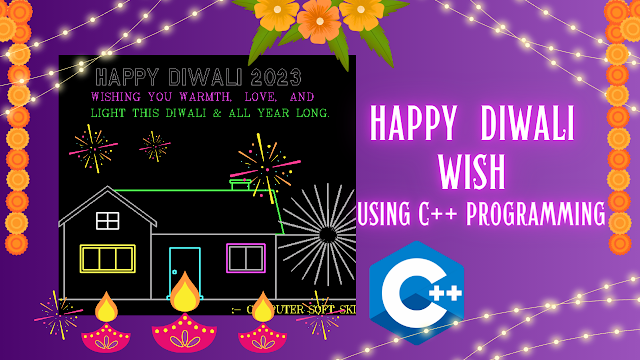
HAPPY DIWALI WISHES USING C++ PROGRAMMING, C++ PROGRAM TO WISH HAPPY DIWALI

HAPPY DIWALI WISHES USING C++ PROGRAMMING | C++ PROGRAM TO WISH HAPPY DIWALI | C++ PROJECT WITH SOURCE CODE

HELLO VIEWERS YOU MIGHT BE INTERESTED IN THIS POST.
Your welcome to our website COMPUTER SOFT SKILLS, after reading this article you can make this in just 2 minutes.
THIS IS C PROGRAMMING TO WISH HAPPY DIWALI.
THIS IS A C++ PROJECT.

YOU CAN COPY THIS CODE AND SAVE IN YOUR SYSTEM.
This Programming created by Rohit, owner of Computer Soft Skills. Yes you read it right! You can make that type of Project easily in C application.

HAPPY DIWALI WISH USING C++


//________ WELCOME ALL OF YOU ON COMPUTER SOFT SKILLS CHANNEL _____________//

//----------------- C++ PROGRAM TO WISH HAPPY DIWALI -------------------//


#include<stdio.h>

#include<conio.h>

#include<graphics.h>

#include<math.h>

#include<dos.h>

#include<stdlib.h>


void home();

void main()

{

int gd=DETECT,gm;

initgraph(&gd,&gm,"C:\\TC\\BGI");


home();

getch();

closegraph();

}


void home()


{

int i=0;

int j,kk;

int color;

int x,y;


i=0;

while(!kbhit())

{


//_______ DRAW HOME _____________

setcolor(7);

setlinestyle(0,0,3);

line(0,450,750,450);


//________Right side

setcolor(color);

rectangle(200,330,430,450);


setcolor(11);

rectangle(230,444,295,450);

rectangle(235,355,290,444);

circle(244,399,3);


setcolor(13);

rectangle(340,348,410,400);


setcolor(color);

rectangle(345,353,405,395);

line(375,353,375,395);


setcolor(10);

line(130,249,426,249);

line(430,330,445,330);

line(445,330,426,249);


rectangle(350,235,380,249);

rectangle(346,230,384,235);


//________Left side


setcolor(color);

line(200,310,200,450);

line(40,310,40,450);


line(30,316,120,250);

line(210,316,120,250);


line(30,307,120,241);

line(210,307,120,241);


line(30,307,30,316);

line(210,307,210,316);


setcolor(14);

rectangle(70,350,170,400);

rectangle(75,355,165,395);


line(105,355,105,395);

line(135,355,135,395);


setcolor(15);

rectangle(100,290,140,320);

line(120,290,120,320);

line(100,305,140,305);

//_________home end___________


//__________crackers___________

setcolor(color);

settextstyle(10,0,3);

outtextxy(100,10,"HAPPY DIWALI 2023");


setcolor(13);

settextstyle(8,0,2);

outtextxy(90,60,"WISHING YOU WARMTH, LOVE, AND");


setcolor(10);

settextstyle(8,0,2);

outtextxy(90,90,"LIGHT THIS DIWALI & ALL YEAR LONG.");


setcolor(14);

settextstyle(1,0,2);

outtextxy(350,455,":- COMPUTER SOFT SKILLS");


setcolor(15);

color=rand()%15+1;

settextstyle(2,0,6);

x=rand()%1366;

y=rand()%768;

for(i=768;i!=y;i--)

{

if(i%50==0)

delay(3);

putpixel(x,i,14);

}

for(i=768;i!=y;i--)

{

if(i%70==0)

delay(30);

putpixel(x,i,0);

}

for(j=0;j!=100;j+=5)

{

for(i=0;i!=360;i+=15)

{

setcolor(color);

line(x,y,x+j*cos(3.14/180*i),y+j*sin(i*3.14/180));

}

}

setcolor(0);

for(j=0;j!=100;j++)

{

for(i=0;i!=360;i+=15)

line(x,y,x+j*cos(3.14/180*i),y+j*sin(i*3.14/180));

}

}

cleardevice();

}


//____________ I HOPE YOU LIKE THIS PROGRAMMING VIDEO ___________________


//____________ LIKE __________ SHARE __________ SUBSCRIBE __________________


If you like this C Programming then share it with your friends, Thanks.


Saturday, November 4, 2023

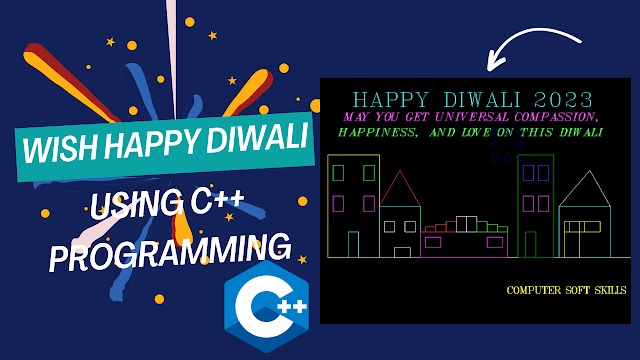
HAPPY DIWALI WISHES USING C++ PROGRAMMING, C++ PROGRAM TO WISH HAPPY DIWALI

HAPPY DIWALI WISHES USING C++ PROGRAMMING | C++ PROGRAM TO WISH HAPPY DIWALI | C++ PROJECT WITH SOURCE CODE

HELLO VIEWERS YOU MIGHT BE INTERESTED IN THIS POST.
Your welcome to our website COMPUTER SOFT SKILLS, after reading this article you can make this in just 2 minutes.
THIS IS C PROGRAMMING TO WISH HAPPY DIWALI.
THIS IS A C++ PROJECT.

YOU CAN COPY THIS CODE AND SAVE IN YOUR SYSTEM.
This Programming created by Rohit, owner of Computer Soft Skills. Yes you read it right! You can make that type of Project easily in C application.

DIWALI C PROGRAMMING


 //________ WELCOME ALL OF YOU ON COMPUTER SOFT SKILLS CHANNEL _____________//

//----------------- C++ PROGRAM TO WISH HAPPY DIWALI -------------------//


#include<stdio.h>

#include<conio.h>

#include<dos.h>

#include<stdlib.h>

#include<graphics.h>


void shoot();

void shootagain();

void area();

void explode(int,int,int);

void main()

{


int gd=DETECT,gm;

initgraph(&gd,&gm,"c:\\tc\\bgi");


shoot();

getch();

closegraph();

}


void shoot()

{

int i=0;

int x=0,y=480,x1=15,y1=460;

while(i<350)

{

area();

line(x+i,y-i,x1+i,y1-i);

delay(50);

i=i+10;

cleardevice();

}

explode(x+350,y-350,5);

shootagain();

}

void shootagain()

{

int i=0;

int x=600,y=480,x1=585,y1=460;

while(i<250)

{

setcolor(15);

area();

line(x-i,y-i,x1-i,y1-i);

delay(30);

i=i+10;

cleardevice();

}

explode(x-300,y-300,5);

}


void explode(int x,int y,int r)

{

int k,j,interval=0;

for(k=0;k<2;k++)

{

interval=interval+50;

for(j=0;j<interval;j++)

{

area();

setcolor(BLACK);

setcolor(rand()/15);

// horizontal left and right

circle(x+j,y,r+k);

circle(x-j,y,r+k);

//vertical up and down

circle(x,y+j,r+k);

circle(x,y-j,r+k);

//slighten down

circle(x+j,y+j,r+k);

circle(x-j,y-j,r+k);

//slighten up

circle(x-j,y+j,r+k);

circle(x+j,y-j,r+k);

delay(30);

cleardevice();

}

}

}


void area()

{

//Home Area___________

setcolor(14);

line(0,350,600,350);


rectangle(0,350,100,150);


setcolor(11);

rectangle(40,350,60,300);


setcolor(10);

rectangle(10,170,30,200);

rectangle(70,170,90,200);


setcolor(13);

rectangle(10,230,30,260);

rectangle(70,230,90,260);


//_____________________________

setcolor(11);

rectangle(100,350,180,250);


setcolor(12);

line(100,250,140,180);

line(180,250,140,180);


setcolor(15);

rectangle(110,280,130,300);

rectangle(150,280,170,300);

rectangle(130,350,160,330);


//___________________________

setcolor(13);

rectangle(180,350,350,300);

rectangle(190,310,220,330);

rectangle(340,310,310,330);


setcolor(12);

rectangle(210,290,190,300);

rectangle(230,285,210,300);

rectangle(250,280,230,300);

setcolor(15);

rectangle(270,270,250,300);

rectangle(290,270,270,300);

setcolor(10);

rectangle(310,280,290,300);

rectangle(330,285,310,300);

rectangle(350,290,330,300);


//________________________

setcolor(2);

rectangle(370,350,440,150);

rectangle(385,350,405,300);


setcolor(9);

rectangle(380,170,400,200);

rectangle(410,170,430,200);


setcolor(13);

rectangle(380,230,400,260);

rectangle(410,230,430,260);


//_____________________

setcolor(11);

rectangle(550,350,450,250);


setcolor(15);

line(550,250,510,180);

line(450,250,510,180);


setcolor(14);

rectangle(530,280,500,300);

rectangle(500,280,470,300);

rectangle(490,280,460,300);

rectangle(490,350,460,300);


//_________________________

setcolor(11);

settextstyle(8,0,5);

outtextxy(50,10,"HAPPY DIWALI 2023");


setcolor(13);

settextstyle(7,0,3);

outtextxy(30,60,"MAY YOU GET UNIVERSAL COMPASSION,");


setcolor(10);

settextstyle(7,0,3);

outtextxy(20,90,"HAPPINESS, AND LOVE ON THIS DIWALI");


setcolor(14);

settextstyle(1,0,2);

outtextxy(350,400,"COMPUTER SOFT SKILLS");

}


//____________ I HOPE YOU LIKE THIS PROGRAMMING  ___________________


//____________ LIKE __________ SHARE __________ SUBSCRIBE __________________


If you like this C Programming then share it with your friends, Thanks.


Tuesday, October 17, 2023

Scientific Calculator Project using C++ Language , C++ Project to Scientific Calculator

Scientific Calculator Project using C++ Language | C++ Project to Scientific Calculator | Scientific Calculator Project with source code in C programming


HELLO VIEWERS YOU MIGHT BE INTERESTED IN THIS POST.

Your welcome to our website COMPUTER SOFT SKILLS, after reading this article you can make this project in just 2 minutes.

THIS IS C++ PROGRAMMING TO CREATE Scientific Calculator Project.
THIS IS A C++ PROJECT.

YOU CAN COPY THIS CODE AND SAVE IN YOUR SYSTEM.

SCIENTIFIC CALCULATOR IN C++ LANGUAGE


This Project Modified by Rohit, owner of Computer Soft Skills. Yes you read it right! You can make that type of Project easily in c++ application.


//____/____ WELCOME ALL OF YOU ON COMPUTER SOFT SKILLS CHANNEL _____\______//


//--------- C++ PROJECT TO CREATE SCIENTIFIC CALCULATOR -------------\\

/*________________________________________________________________________*/


#include<iostream.h>

#include<stdio.h>

#include<conio.h>

#include<math.h>

#include<dos.h>

#include<graphics.h>

#include<stdlib.h>

#define PI 3.14


long int a,c,d,e[100],i,fact=1,t,sub,sum=0,x;

float root1,root2,b,f,g;

double h,j;

void main()

{

clrscr();

int gd=DETECT,gm;

initgraph(&gd,&gm,"C:\\TC\\BGI");


setcolor(11);

settextstyle(0,0,2);

outtextxy(50,10,"--- SCIENTIFIC CALCULATOR ---");


delay(800);

 do

 {

setcolor(14);

settextstyle(1,0,2);

outtextxy(50,35,"1. Arithmetic Operations");


setcolor(14);

settextstyle(1,0,2);

outtextxy(50,65,"2. Trignometric functions");


setcolor(14);

settextstyle(1,0,2);

outtextxy(50,95,"3. Lograthmic functions");


setcolor(14);

settextstyle(1,0,2);

outtextxy(50,125,"4. Power functions ");


setcolor(14);

settextstyle(1,0,2);

outtextxy(50,155,"5. Hyperbolic functions");


setcolor(14);

settextstyle(1,0,2);

outtextxy(50,185,"6. Factorial");


setcolor(14);

settextstyle(1,0,2);

outtextxy(50,215,"7. Roots of quadratic eqn. ");


setcolor(14);

settextstyle(1,0,2);

outtextxy(50,245,"8. Exit");


setcolor(15);

settextstyle(0,0,2);

outtextxy(0,275,"-----------------------------------------------");


cout<<"\n\n\n\n\n\n\n\n\n\n\n\n\n\n\n\n\n\n\n"<<"ENTER YOUR CHOICE\t";

cin>>a;

switch(a)

{


case 1:

cout<<"\n"<<"\t"<<"1.Addition(+)";

cout<<"\n"<<"\t"<<"2.Subtraction(-)";

cout<<"\n"<<"\t"<<"3.Multiplication(*)";

cout<<"\n"<<"\t"<<"4.Division(/)";

cout<<"\n"<<"--------------------------------------------------------------------------------";

cin>>c;

if (c==1)

{

cout<<"\n"<<"How much no you want to print ";

cin>>a;


cout<<"\n"<<"Enter the no  ";

for(b=0;b<a;b++)

cin>>e[b];


for(b=0;b<a;b++)

{

sum=sum+e[b];

}

cout<<"\n"<<"Sum = "<<sum;

cout<<"\n"<<"-----------------------------------";


}


else if(c==2)

{


cout<<"\n"<<"Enter the 1st no ";

cin>>a;

cout<<"\n"<<"Enter the 2nd no ";

cin>>d;

sub=a-d;


cout<<"\n"<<"Sububtraction = "<<sub;

cout<<"\n"<<"----------------------------------";

break;

}

else if(c==3)

{

cout<<"\n"<<"Enter the first no. ";

cin>>a;

cout<<"\n"<<"Enter the second no. ";

cin>>c;

d=a*c;

cout<<"\n"<<"Answer = "<<d;

cout<<"\n"<<"--------------------------------------------";

break;

}

 else if(c==4)

 {

cout<<"\n"<<"Enter the no ...  like a/b";

cin>>b>>f;


g=b/f;

cout<<"\n"<<"Division = "<< g;

cout<<"\n"<<"-----------------------------------";

break;

}

else

{

cout<<"\n"<<"INVALID CHOICE";

}

break;

case 2: cout<<"\n"<<"1. sinx";

cout<<"\n"<<"2. cosx";

cout<<"\n"<<"3. tanx";

cout<<"\n"<<"-----------------------------------";

cout<<"\n"<<"Enter your choice ";

cin>>c;

if (c==1)

{

cout<<"\n"<<"Enter angle";

cin>>h;

j=sin(h*PI/180);

cout<<"\n"<<"sin"<<h<<" = "<<j;

cout<<"\n"<<"----------------------------------";

break;

}

else if (c==2)

{

cout<<"\n"<<"Enter angle ";

cin>>h;

j=cos(h*PI/180);

cout<<"\n"<<"cos"<<h<<" = "<<j;

cout<<"\n"<<"--------------------------------";

break;

}

else if (c==3)


{

cout<<"\n"<<"Enter angle ";

cin>>h;

j=tan(h*PI/180);

cout<<"\n"<<"tan"<<h<<" = "<<j;

cout<<"\n"<<"----------------------------------";

break;

}

else

{

cout<<"\n"<<"INVALID CHOICE ";

cout<<"\n"<<"----------------------------------";


}

break;

case 3: cout<<"\n"<<"1. log10 ";

cout<<"\n"<<"2. log ";

cout<<"\n"<<"Enter your choice ";

cin>>a;

if(a==1)

{

cout<<"\n"<<"Enter no.";

cin>>h;

f=log10(h);

cout<<"\n"<<"log10"<<h<<" = "<<f;

break;

}


else

 if (a==2)

{

cout<<"\n"<<" ln";

cout<<"\n"<<"Enter no. ";

cin>>f;

g=log(f);

cout<<"\n"<<"ln"<<f<<" = "<<g;

cout<<"\n"<<"----------------------------------";

}


break;

case 4:

cout<<"\n"<<"1. Square (x^2) ";

cout<<"\n"<<"2. Cube   (x^3) ";

cout<<"\n"<<"3. Square root ";

cout<<"\n"<<"4. Cube root ";

cout<<"\n"<<"5. Power ";

cout<<"\n"<<"--------------------------";

cout<<"\n"<<"Enter your choice ";

cin>>t;

if(t==1)

{

cout<<"\n"<<"Enter value ";

cin>>b;


c=b*b;

cout<<c;

cout<<"\n"<<"------------------------------";

 break;

 }

 else if(t==2)

 {


 cout<<"\n"<<"Enter value ";

cin>> b;


c=b*b*b;

cout<<c;

cout<<"\n"<<"-------------------------";

break;

}


else if(t==3)

{

cout<<"\n"<<"Enter  value ";

cin>>a;


b=sqrt(a);

cout<<b;

cout<<"\n"<<"---------------------------";

 break;

}

else if (t==4)

{

cout<<"\n"<<"Enter  no ";

cin>>h;

j=pow(h,(1.0/3.0));


cout<<"\n"<<j;

 break;

}


else if(t==5)

{

cout<<"\n"<<"Enter no ";

cin>>a;

cout<<"\n"<<"enter power ";

cin>>b;

d=pow(a,b);


cout<<"\n"<<d;

cout<<"\n"<<"--------------------------";


}

else

{

cout<<"\n"<<"INVALID CHOICE";

cout<<"\n"<<"----------------------------";


} break;

case 5:

cout<<"\n"<<"1. Sinhx ";

cout<<"\n"<<"2. Coshx ";

cout<<"\n"<<"3. Tanhx ";

cout<<"\n"<<"-----------------------------";

cout<<"\n"<<"Enter your choice ";

cin>>a;

if (a==1)

{

cout<<"\n"<<"Enter no ";

cin>>h;

h=log(2.0);

j=sinh(h);

cout<<"\n"<<j;

cout<<"\n"<<"-----------------------------";

break;

}

else if (a==2)

{

cout<<"\n"<<"Enter  no ";

cin>>h;

h=log(2.0);

j=cosh(h);

cout<<"\n"<<j;

cout<<"\n"<<"-------------------------";

break;

}

else if (a==3)

{

cout<<"\n"<<"Enter  no ";

cin>>h;

h=log(2.0);

j=tanh(h);

cout<<"\n"<<j;

cout<<"\n"<<"----------------------------";

break;

}

else

{

cout<<"\n"<<"INVALID CHOICE";

}

break;

case 6:

{

cout<<"\n"<<"Enter no ";

cin>>a;


for(i=a;i>=1;i--)

fact=fact*i;

cout<<"\n"<<a<<"!"<<" = "<<fact;

cout<<"\n"<<"---------------------------";


}

break;

case 7:

{

cout<<"\n"<<"Enter the value of a , b , c of eqn. ax^2+bx+c ";

cin>>a>>b>>c;


d=b*b-4*a*c;

if (d>0)

{

root1=(-b+sqrt(d))/(2*a);

root2= (-b-sqrt(d))/(2*a);

cout<<"\n"<<"roots are real or unequal";

cout<<"\n"<<"root 1 = "<<root1;

cout<<"\n"<<"root 2 = "<<root2;


}

else if (d==0)

{

root1=-b/(2*a);

cout<<"\n"<<"roots are real and equal";

cout<<"\n"<<"root 1 = "<<root1;

cout<<"\n"<<"root 2 = "<<root1;


}

else

cout<<"\n"<<"roots are complex and imaginary";

cout<<"\n"<<"---------------------------------";


} break;

case 8:

{

exit(0);

}

break;

default:

cout<<"\n"<<"invalid choice";

}

cout<<"\n"<<"Press any to continue...";

cin>>x;

}

while(x!='0');


getch();

}


/*---------------- I HOPE YOU LIKE THIS C++ PROJECT ---------------------*/


/*____________ LIKE __________ SHARE _________ SUBSCRIBE _________________*/


If you like that Programming article then share it with your friends, Thanks.

Featured Post

C++ Program to Create C++ Project to do Sunflower field with sky, cloud and sun

C++ Program to Create C++ Project to do Sunflower field with sky, cloud and sun HELLO VIEWERS YOU MIGHT BE INTERESTED IN THIS POST. Your wel...

Popular Posts