Subscribe Our Channel

header ads

Search This Blog

Saturday, July 22, 2023

SHIN-CHAN DRAWING IN PYTHON PROGRAMMING | HOW TO DRAW SHINCHAN BY PYTHON LANGUAGE | PYTHON TURTLE GRAPHICS PROGRAMS | SOURCE CODE | CARTOON DRAWING USING PYTHON

  #___________ WELCOME ALL OF YOU ON COMPUTER SOFT SKILLS CHANEEL __________

#......................... PYTHON PROGRAM TO DRAW SHINCHAN ....................


from turtle import *

import turtle


turtle.bgcolor('aliceblue')

wn = turtle.Screen()

wn.setup(width=1000, height=800)

speed(6)


def myPosition(x, y):

    penup()

    goto(x, y)

    pendown()


pensize(3)


def underpants():

    color('green')

    fillcolor('greenyellow')

    begin_fill()

    right(25)

    forward(20)

    right(45)

    forward(20)

    left(70)

    forward(90)

    left(95)

    forward(75)

    left(85)

    forward(175)

    left(85)

    forward(75)

    left(95)

    forward(90)

    left(85)

    forward(18)

    end_fill()


def leftLeg():

    myPosition(-39, -25)

    color('sandybrown')

    fillcolor("peachpuff")

    begin_fill()

    right(89)

    forward(25)

    right(90)

    forward(50)

    right(90)

    forward(20)

    right(85)

    forward(50)

    end_fill()


def leftSock():

    myPosition(-36, -78)

    color('teal')

    fillcolor("aqua")

    begin_fill()

    right(90)

    circle(80, 13)

    right(110)

    forward(22)

    right(85)

    forward(19)

    right(90)

    forward(21)

    end_fill()


def leftShoe():

    myPosition(-69, -112)

    color('coral')

    fillcolor("yellow")

    begin_fill()

    right(90)

    left(5)

    forward(56)

    left(105)

    forward(13)

    left(75)

    forward(20)

    right(90)

    forward(15)

    circle(10, 15)

    left(80)

    forward(4)

    circle(10, 15)

    left(40)

    circle(20, 15)

    forward(10)

    right(45)

    forward(15)

    circle(25, 25)

    end_fill()


def rightLeg():

    myPosition(60, -28)

    color('sandybrown')

    fillcolor("peachpuff")

    begin_fill()

    left(128)

    forward(25)

    right(95)

    forward(55)

    right(90)

    forward(20)

    right(85)

    forward(55)

    end_fill()


def rightSock():

    myPosition(64, -79)

    color('teal')

    fillcolor("aqua")

    begin_fill()

    right(90)

    circle(90, 14)

    right(110)

    forward(23)

    right(90)

    forward(15)

    right(80)

    forward(21)

    end_fill()


def rightShoe():

    myPosition(64, -108)

    color('coral')

    fillcolor("yellow")

    begin_fill()

    right(100)

    forward(56)

    left(160)

    forward(25)

    right(68)

    forward(17)

    left(90)

    circle(18, 15)

    forward(5)

    left(75)

    forward(11)

    right(85)

    forward(20)

    left(45)

    circle(10, 30)

    left(25)

    forward(5)

    end_fill()


def myShirt():

    myPosition(-75, 48)

    color('red')

    fillcolor("tomato")

    begin_fill()

    left(72)

    forward(185)

    left(87)

    forward(75)

    right(68)

    circle(20, 8)

    circle(300, 23)

    left(90)

    circle(35, 17)

    right(38)

    circle(35, 17)

    left(58)

    forward(75)

    right(12)

    forward(140)

    right(40)

    forward(93)

    left(120)

    circle(-20, 65)

    left(75)

    forward(10)

    left(23)

    forward(88)

    right(31)

    forward(87)

    right(180)

    forward(108)

    right(180)

    forward(104)

    circle(10, 70)

    end_fill()


def myHead():

    myPosition(-20, 295)

    left(20)

    pensize(2)

    fillcolor('peachpuff')

    begin_fill()

    right(90)

    forward(40)

    right(90)

    circle(50, 80)

    left(10)

    circle(50, 80)

    left(2)

    circle(200, 50)


    left(48)

    forward(60)

    circle(45, 60)

    right(5)

    circle(100, 85)

    end_fill()

    color('black')

    fillcolor('black')

    begin_fill()


    pensize(2)

    right(170)

    circle(-100, 165)

    right(78)

    forward(26)

    right(87)

    forward(55)

    circle(45, 60)

    right(5)

    circle(100, 85)

    end_fill()


    color('red')

    fillcolor('peachpuff')

    begin_fill()

    right(180)

    circle(-100, 105)

    right(37)

    forward(49)

    pensize(2)

    left(130)

    forward(30)

    circle(-10, 70)

    right(50)

    forward(36)

    right(80)

    forward(50)

    pencolor('red')

    right(90)

    forward(30)

    end_fill()


def rightHand():

    myPosition(197, 209)

    pencolor('sandybrown')

    fillcolor('peachpuff')

    begin_fill()

    right(45)

    forward(6)

    left(55)

    forward(20)

    circle(-5, 70)

    right(100)

    forward(18)

    left(105)

    forward(18)

    circle(-5, 70)

    right(100)

    forward(18)

    left(145)

    forward(15)

    circle(-5, 70)

    right(100)

    forward(18)


    left(150)

    forward(13)

    circle(-5, 70)

    right(100)

    forward(15)


    left(150)

    forward(10)

    circle(-5, 70)

    right(100)

    forward(12)

    circle(60, 10)

    left(45)

    forward(6)

    right(90)

    forward(10)

    end_fill()


def leftHand():

    myPosition(-94, 242)

    fillcolor('peachpuff')

    begin_fill()

    right(10)

    forward(6)

    left(90)

    penup()

    forward(12)

    pendown()

    left(90)

    forward(8)

    left(90)

    forward(12)

    end_fill()


def myBis():

    myPosition(-103, 291)

    right(90)

    color('indigo')

    fillcolor('mediumorchid')

    begin_fill()

    right(90)

    forward(55)

    left(80)

    forward(12)

    left(10)

    forward(17)

    left(10)

    forward(12)

    left(80)

    forward(55)

    left(80)

    forward(12)

    left(10)

    forward(17)

    left(10)

    forward(12)

    left(80)

    left(80)

    forward(12)

    left(10)

    forward(17)

    left(10)

    forward(12)

    end_fill()

    penup()

    right(100)

    forward(20)

    right(90)

    forward(14)

    pendown()

    pensize(1)

    pencolor('orange')

    fillcolor('gold')

    begin_fill()

    for i in range(5):

        forward(15)

        right(144)

    end_fill()

    penup()

    forward(27)

    left(90)

    forward(16)

    left(90)

    forward(7)

    pendown()

    fillcolor('gold')

    begin_fill()

    for i in range(5):

        forward(10)

        right(144)

    end_fill()

    penup()

    forward(20)

    right(90)

    forward(5)

    pendown()

    fillcolor('gold')

    begin_fill()

    for i in range(5):

        forward(10)

        right(144)

    end_fill()

    penup()

    right(180)

    forward(6)

    pendown()

    fillcolor('gold')

    begin_fill()

    for i in range(5):

        forward(10)

        right(144)

    end_fill()


def leftHand2():

    myPosition(-112, 284)

    pencolor('sandybrown')

    fillcolor('peachpuff')

    begin_fill()

    right(180)

    forward(31)

    left(90)

    for i in range(2):

        circle(4, 90)

    for i in range(3):

        right(180)

        for i in range(2):

            circle(4, 90)

    end_fill()


def myMouth():

    color('black')

    myPosition(-25, 200)

    left(65)

    fillcolor('indianred')

    begin_fill()


    for i in range(2):

        circle(25, 90)

        circle(25 // 2, 90)

    end_fill()


def myEyebrow(x, y):

    myPosition(x, y)

    pensize(18)

    right(150)

    forward(25)

    right(90)

    for i in range(1):

        right(45)

        dot(15)

    left(55)

    forward(25)

    for i in range(1):

        right(45)

        dot(15)


def myEyelid(x, y):

    myPosition(x, y)

    pensize(2)

    left(170)

    circle(-23, 180)


def myallEyes1(x, y):

    myPosition(x, y)

    right(90)

    fillcolor('black')

    begin_fill()

    circle(18)

    end_fill()

    left(90)

    penup()

    forward(19)

    right(90)

    forward(7)

    pendown()

    fillcolor('white')

    begin_fill()

    left(90)

    circle(9)

    end_fill()


def myallEyes2(x, y):

    myPosition(x, y)

    right(90)

    fillcolor('black')

    begin_fill()

    circle(18)

    end_fill()

    left(90)

    penup()

    forward(19)

    right(90)

    forward(8)

    pendown()

    fillcolor('white')

    begin_fill()

    left(90)

    circle(9)

    end_fill()


def myRobot():

    myPosition(155, -105)

    left(93)

    color('deeppink')

    pensize(7)


    begin_fill()

    forward(50)

    left(90)

    forward(50)

    left(90)

    forward(50)

    left(90)

    forward(50)

    left(90)

    end_fill()


    color('white')

    penup()

    left(90)

    forward(30)

    right(90)

    forward(12)

    pendown()

    pensize(3)

    circle(5)

    penup()

    forward(25)

    pendown()

    circle(5)


    penup()

    right(90)

    forward(20)

    right(90)

    pendown()


    begin_fill()

    forward(23)

    right(90)

    forward(7)

    right(90)

    forward(23)

    right(90)

    forward(7)

    right(90)

    end_fill()


    penup()

    forward(25)

    right(90)

    forward(35)

    pendown()


    color('red')

    forward(30)

    penup()

    right(90)

    pendown()

    begin_fill()

    circle(5)

    end_fill()


def allLegs():

    leftLeg()

    leftSock()

    leftShoe()

    rightLeg()

    rightSock()

    rightShoe()


def allHands():

    rightHand()

    leftHand()

    myBis()

    leftHand2()


def allEyebrows():

    myEyebrow(-8, 300)

    right(90)

    myEyebrow(72, 300)

    myEyelid(-9, 270)

    left(15)

    myEyelid(68, 265)


def allEyes():

    myallEyes1(17, 275)

    myallEyes2(95, 270)


def my_goto(x, y):

    penup()

    goto(x, y)

    pendown()


underpants()

allLegs()

myShirt()

myHead()

allHands()

myMouth()

allEyebrows()

allEyes()

myRobot()

ht()


my_goto(0, -300)

write('COMPUTER SOFT SKILLS', font=("Bradley Hand ITC", 30, "bold"))

my_goto(0, -350)

write('"-ROHIT-"', font=("Bradley Hand ITC", 40, "bold"))


done()


#______________ I HOPE YOU LIKE THIS PROGRAMMING _______________


#________________LIKE _________________SHARE _________________SUBSCRIBE ________________


DORAEMON DRAWING IN PYTHON PROGRAMMING | How to draw Doraemon in coding language | python turtle graphics | python graphics | learn python turtle

  #___________ WELCOME ALL OF YOU ON COMPUTER SOFT SKILLS CHANEEL __________

#......................... PYTHON PROGRAM TO DRAW DORAEMON ....................


from turtle import *

import turtle

turtle.bgcolor('lightskyblue')

wn = turtle.Screen()

wn.setup(width=1000, height=800)


def my_goto(x, y):

    penup()

    goto(x, y)

    pendown()


#__________EYE__________

def eyes():

    fillcolor("SLATEGRAY")

    begin_fill()


    tracer(False)

    a = 2.5

    for i in range(120):

        if 0 <= i < 30 or 60 <= i < 90:

            a -= 0.05

            lt(3)

            fd(a)

        else:

            a += 0.05

            lt(3)

            fd(a)

    tracer(True)

    end_fill()


#___________BEARD_________

def beard():

    my_goto(-32, 135)

    seth(165)

    fd(60)


    my_goto(-32, 125)

    seth(180)

    fd(60)


    my_goto(-32, 115)

    seth(193)

    fd(60)


    my_goto(37, 135)

    seth(15)

    fd(60)


    my_goto(37, 125)

    seth(0)

    fd(60)


    my_goto(37, 115)

    seth(-13)

    fd(60)


#__________MOUTH______________

def mouth():

    my_goto(5, 148)

    seth(270)

    fd(100)

    seth(0)

    circle(120, 50)

    seth(230)

    circle(-120, 100)


#________SCARF____________

def scarf():

    fillcolor('CRIMSON')

    begin_fill()

    seth(0)

    fd(200)

    circle(-5, 90)

    fd(10)

    circle(-5, 90)

    fd(207)

    circle(-5, 90)

    fd(10)

    circle(-5, 90)

    end_fill()


#__________NOSE______________

def nose():

    my_goto(-10, 158)

    seth(315)

    fillcolor('tomato')

    begin_fill()

    circle(20)

    end_fill()


 #__________EYE______________   

def black_eyes():

    seth(0)

    my_goto(-20, 195)

    fillcolor('black')

    begin_fill()

    circle(13)

    end_fill()


    pensize(6)

    my_goto(20, 205)

    seth(75)

    circle(-10, 150)

    pensize(3)


    my_goto(-17, 200)

    seth(0)

    fillcolor('SNOW')

    begin_fill()

    circle(5)

    end_fill()

    my_goto(0, 0)


 # ___________FACE__________

def face():

    fd(183)

    lt(45)

    fillcolor('SNOW')

    begin_fill()

    circle(120, 100)

    seth(180)


    fd(121)

    pendown()

    seth(215)

    circle(120, 100)

    end_fill()

    my_goto(63.56,218.24)

    seth(90)

    eyes()

    seth(180)

    penup()

    fd(60)

    pendown()

    seth(90)

    eyes()

    penup()

    seth(180)

    fd(64)


 #_____HEAD _____________ 

def head():

    penup()

    circle(150, 40)

    pendown()

    fillcolor('DODGERBLUE')

    begin_fill()

    circle(150, 280)

    end_fill()


 # ________DORAEMON BODY______________

def Doraemon():

    head()

    scarf()

    face()

    black_eyes()

    nose()

    mouth()

    beard()

    my_goto(0, 0)

    seth(0)

    penup()

    circle(150, 50)

    pendown()

    seth(30)

    fd(40)

    seth(70)

    circle(-30, 270)


    fillcolor('DODGERBLUE')

    begin_fill()

    seth(230)

    fd(80)

    seth(90)

    circle(1000, 1)

    seth(-89)

    circle(-1000, 10)


    seth(180)

    fd(70)

    seth(90)

    circle(30, 180)

    seth(180)

    fd(70)


    seth(100)

    circle(-1000, 9)

    seth(-86)

    circle(1000, 2)

    seth(230)

    fd(40)


    circle(-30, 230)

    seth(45)

    fd(81)

    seth(0)

    fd(203)

    circle(5, 90)

    fd(10)

    circle(5, 90)

    fd(7)

    seth(40)

    circle(150, 10)

    seth(30)

    fd(40)

    end_fill()


    seth(70)

    fillcolor('SNOW')

    begin_fill()

    circle(-30)

    end_fill()


    my_goto(103.74, -182.59)

    seth(0)

    fillcolor('SNOW')

    begin_fill()

    fd(15)

    circle(-15, 180)

    fd(90)

    circle(-15, 180)

    fd(10)

    end_fill()


    my_goto(-96.26, -182.59)

    seth(180)

    fillcolor('SNOW')

    begin_fill()

    fd(15)

    circle(15, 180)

    fd(90)

    circle(15, 180)

    fd(10)

    end_fill()


    my_goto(-133.97, -91.81)

    seth(50)

    fillcolor('SNOW')

    begin_fill()

    circle(30)

    end_fill()


    my_goto(-103.42, 15.09)

    seth(0)

    fd(38)

    seth(230)

    begin_fill()

    circle(90, 260)

    end_fill()


    my_goto(5, -40)

    seth(0)

    fd(70)

    seth(-90)

    circle(-70, 180)

    seth(0)

    fd(70)


    my_goto(-103.42, 15.09)

    fd(90)

    seth(70)

    fillcolor('GOLD')


    begin_fill()

    circle(-20)

    end_fill()

    seth(170)

    fillcolor('GOLD')

    begin_fill()

    circle(-2, 180)

    seth(10)

    circle(-100, 22)

    circle(-2, 180)

    seth(180-10)

    circle(100, 22)

    end_fill()

    goto(-13.42, 15.09)

    seth(250)

    circle(20, 110)

    seth(90)

    fd(15)

    dot(10)

    my_goto(0, -150)


if __name__ == '__main__':

    pensize(3)

    speed(9)

    Doraemon()

    my_goto(0, -300)

    write('COMPUTER SOFT SKILLS', font=("Bradley Hand ITC", 30, "bold"))

    my_goto(0, -350)

    write('"-ROHIT-"', font=("Bradley Hand ITC", 40, "bold"))

    mainloop()


#______________ I HOPE YOU LIKE THIS PROGRAMMING _______________


#________________LIKE _________________SHARE _________________SUBSCRIBE ________________

PIKACHU DRAWING USING PYTHON LANGUAGE | HOW TO DRAW PIKACHU IN PYTHON PROGRAMMING | LEARN PYTHON CODING | python turtle graphics

 # WELCOME ALL OF YOU ON COMPUTER SOFT SKILLS CHANNEL

# PTHON PROGRAM TO DRAW PIKACHU WITH ANIMATION


import turtle


turtle.bgcolor('GOLD')


def getPosition(x, y):

    turtle.setx(x)

    turtle.sety(y)

    print(x, y)


class Pikachu:


    def __init__(self):

        self.t = turtle.Turtle()

        t = self.t

        t.pensize(3)

        t.speed(9)

        t.ondrag(getPosition)


    def noTrace_goto(self, x, y):

        self.t.penup()

        self.t.goto(x, y)

        self.t.pendown()


    def leftEye(self, x, y):

        self.noTrace_goto(x, y)

        t = self.t

        t.seth(0)

        t.fillcolor('GRAY')

        t.begin_fill()

        t.circle(22)

        t.end_fill()


        self.noTrace_goto(x, y + 10)

        t.fillcolor('BLACK')

        t.begin_fill()

        t.circle(10)

        t.end_fill()


        self.noTrace_goto(x + 6, y + 22)

        t.fillcolor('SNOW')

        t.begin_fill()

        t.circle(10)

        t.end_fill()


    def rightEye(self, x, y):

        self.noTrace_goto(x, y)

        t = self.t

        t.seth(0)

        t.fillcolor('GRAY')

        t.begin_fill()

        t.circle(22)

        t.end_fill()


        self.noTrace_goto(x, y + 10)

        t.fillcolor('BLACK')

        t.begin_fill()

        t.circle(10)

        t.end_fill()


        self.noTrace_goto(x - 6, y + 22)

        t.fillcolor('SNOW')

        t.begin_fill()

        t.circle(10)

        t.end_fill()


    def mouth(self, x, y):

        self.noTrace_goto(x, y)

        t = self.t


        t.fillcolor('CRIMSON')

        t.begin_fill()


 # Lower Lip _________________

        l1 = []

        l2 = []

        t.seth(190)

        a = 0.7

        for i in range(28):

            a += 0.1

            t.right(3)

            t.fd(a)

            l1.append(t.position())


        self.noTrace_goto(x, y)


        t.seth(10)

        a = 0.7

        for i in range(28):

            a += 0.1

            t.left(3)

            t.fd(a)

            l2.append(t.position())


  # Upper Lip _______________________________-

        t.seth(10)

        t.circle(50, 15)

        t.left(180)

        t.circle(-50, 15)


        t.circle(-50, 40)

        t.seth(233)

        t.circle(-50, 55)

        t.left(180)

        t.circle(50, 12.1)

        t.end_fill()


# Tongue ___________________

        self.noTrace_goto(17, 54)

        t.fillcolor('HOTPINK')

        t.begin_fill()

        t.seth(145)

        t.circle(40, 86)

        t.penup()

        for pos in reversed(l1[:20]):

            t.goto(pos[0], pos[1] + 1.5)

        for pos in l2[:20]:

            t.goto(pos[0], pos[1] + 1.5)

        t.pendown()

        t.end_fill()


# Nose _______________________-

        self.noTrace_goto(-17, 94)

        t.seth(8)

        t.fd(4)

        t.back(8)


 # Red Cheeks ______________________

    def leftCheek(self, x, y):

        turtle.tracer(False)

        t = self.t

        self.noTrace_goto(x, y)

        t.seth(300)

        t.fillcolor('TOMATO')

        t.begin_fill()

        a = 2.3

        for i in range(120):

            if 0 <= i < 30 or 60 <= i < 90:

                a -= 0.05

                t.lt(3)

                t.fd(a)

            else:

                a += 0.05

                t.lt(3)

                t.fd(a)

        t.end_fill()

        turtle.tracer(True)


    def rightCheek(self, x, y):

        t = self.t

        turtle.tracer(False)

        self.noTrace_goto(x, y)

        t.seth(60)

        t.fillcolor('TOMATO')

        t.begin_fill()

        a = 2.3

        for i in range(120):

            if 0 <= i < 30 or 60 <= i < 90:

                a -= 0.05

                t.lt(3)

                t.fd(a)

            else:

                a += 0.05

                t.lt(3)

                t.fd(a)

        t.end_fill()

        turtle.tracer(True)


    def colorLeftEar(self, x, y):

        t = self.t

        self.noTrace_goto(x, y)

        t.fillcolor('PERU')

        t.begin_fill()

        t.seth(330)

        t.circle(100, 35)

        t.seth(219)

        t.circle(-300, 19)

        t.seth(110)

        t.circle(-30, 50)

        t.circle(-300, 10)

        t.end_fill()


    def colorRightEar(self, x, y):

        t = self.t

        self.noTrace_goto(x, y)

        t.fillcolor('PERU')

        t.begin_fill()

        t.seth(300)

        t.circle(-100, 30)

        t.seth(35)

        t.circle(300, 15)

        t.circle(30, 50)

        t.seth(190)

        t.circle(300, 17)

        t.end_fill()


    def body(self):

        t = self.t


        t.fillcolor('YELLOW')

        t.begin_fill()


 # Right face contour ____________________

        t.penup()

        t.circle(130, 40)

        t.pendown()

        t.circle(100, 105)

        t.left(180)

        t.circle(-100, 5)


 # Right ear ____________________

        t.seth(20)

        t.circle(300, 30)

        t.circle(30, 50)

        t.seth(190)

        t.circle(300, 36)


  # Upper profile ____________________

        t.seth(150)

        t.circle(150, 70)


  # Left ear ________________________

        t.seth(200)

        t.circle(300, 40)

        t.circle(30, 50)

        t.seth(20)

        t.circle(300, 35)


 # Left face contour  _________________

        t.seth(240)

        t.circle(105, 95)

        t.left(180)

        t.circle(-105, 5)


# Left hand _________________

        t.seth(210)

        t.circle(500, 18)

        t.seth(200)

        t.fd(10)

        t.seth(280)

        t.fd(7)

        t.seth(210)

        t.fd(10)

        t.seth(300)

        t.circle(10, 80)

        t.seth(220)

        t.fd(10)

        t.seth(300)

        t.circle(10, 80)

        t.seth(240)

        t.fd(12)

        t.seth(0)

        t.fd(13)

        t.seth(240)

        t.circle(10, 70)

        t.seth(10)

        t.circle(10, 70)

        t.seth(10)

        t.circle(300, 18)


        t.seth(75)

        t.circle(500, 8)

        t.left(180)

        t.circle(-500, 15)

        t.seth(250)

        t.circle(100, 65)


# Left foot _____________________

        t.seth(320)

        t.circle(100, 5)

        t.left(180)

        t.circle(-100, 5)

        t.seth(220)

        t.circle(200, 20)

        t.circle(20, 70)


        t.seth(60)

        t.circle(-100, 20)

        t.left(180)

        t.circle(100, 20)

        t.seth(300)

        t.circle(10, 70)


        t.seth(60)

        t.circle(-100, 20)

        t.left(180)

        t.circle(100, 20)

        t.seth(10)

        t.circle(100, 60)


  # Horizontal __________________________

        t.seth(180)

        t.circle(-100, 10)

        t.left(180)

        t.circle(100, 10)

        t.seth(5)

        t.circle(100, 10)

        t.circle(-100, 40)

        t.circle(100, 35)

        t.left(180)

        t.circle(-100, 10)


 # Right foot ____________________

        t.seth(290)

        t.circle(100, 55)

        t.circle(10, 50)


        t.seth(120)

        t.circle(100, 20)

        t.left(180)

        t.circle(-100, 20)


        t.seth(0)

        t.circle(10, 50)


        t.seth(110)

        t.circle(100, 20)

        t.left(180)

        t.circle(-100, 20)


        t.seth(30)

        t.circle(20, 50)


        t.seth(100)

        t.circle(100, 40)


# Right body contour _______________________

        t.seth(200)

        t.circle(-100, 5)

        t.left(180)

        t.circle(100, 5)

        t.left(30)

        t.circle(100, 75)

        t.right(15)

        t.circle(-300, 21)

        t.left(180)

        t.circle(300, 3)


# Right hand ____________________

        t.seth(43)

        t.circle(200, 60)


        t.right(10)

        t.fd(10)


        t.circle(5, 160)

        t.seth(90)

        t.circle(5, 160)

        t.seth(90)


        t.fd(10)

        t.seth(90)

        t.circle(5, 180)

        t.fd(10)


        t.left(180)

        t.left(20)

        t.fd(10)

        t.circle(5, 170)

        t.fd(10)

        t.seth(240)

        t.circle(50, 30)


        t.end_fill()

        self.noTrace_goto(130, 125)

        t.seth(-20)

        t.fd(5)

        t.circle(-5, 160)

        t.fd(5)


  # Fingers ______________________

        self.noTrace_goto(166, 130)

        t.seth(-90)

        t.fd(3)

        t.circle(-4, 180)

        t.fd(3)

        t.seth(-90)

        t.fd(3)

        t.circle(-4, 180)

        t.fd(3)


  # Tail ______________________

        self.noTrace_goto(168, 134)

        t.fillcolor('YELLOW')

        t.begin_fill()

        t.seth(40)

        t.fd(200)

        t.seth(-80)

        t.fd(150)

        t.seth(210)

        t.fd(150)

        t.left(90)

        t.fd(100)

        t.right(95)

        t.fd(100)

        t.left(110)

        t.fd(70)

        t.right(110)

        t.fd(80)

        t.left(110)

        t.fd(30)

        t.right(110)

        t.fd(32)


        t.right(106)

        t.circle(100, 25)

        t.right(15)

        t.circle(-300, 2)


        t.seth(30)

        t.fd(40)

        t.left(100)

        t.fd(70)

        t.right(100)

        t.fd(80)

        t.left(100)

        t.fd(46)

        t.seth(66)

        t.circle(200, 38)

        t.right(10)

        t.fd(10)

        t.end_fill()


 # Tail Pattern ___________________

        t.fillcolor('PERU')

        self.noTrace_goto(126.82, -156.84)

        t.begin_fill()


        t.seth(30)

        t.fd(40)

        t.left(100)

        t.fd(40)

        t.pencolor('sienna')

        t.seth(-30)

        t.fd(30)

        t.left(140)

        t.fd(20)

        t.right(150)

        t.fd(20)

        t.left(150)

        t.fd(20)

        t.right(150)

        t.fd(20)

        t.left(130)

        t.fd(18)

        t.pencolor('black')

        t.seth(-45)

        t.fd(67)

        t.right(110)

        t.fd(80)

        t.left(110)

        t.fd(30)

        t.right(110)

        t.fd(32)

        t.right(106)

        t.circle(100, 25)

        t.right(15)

        t.circle(-300, 2)

        t.end_fill()


  # Hat, Eye, Mouth, Cheek _____________________

        self.cap(-134.07, 147.81)

        self.mouth(-5, 25)

        self.leftCheek(-126, 32)

        self.rightCheek(107, 63)

        self.colorLeftEar(-250, 100)

        self.colorRightEar(140, 270)

        self.leftEye(-85, 90)

        self.rightEye(50, 110)

        t.hideturtle()


    def cap(self, x, y):

        self.noTrace_goto(x, y)

        t = self.t

        t.fillcolor('BLUEVIOLET')

        t.begin_fill()

        t.seth(200)

        t.circle(400, 7)

        t.left(180)

        t.circle(-400, 30)

        t.circle(30, 60)

        t.fd(50)

        t.circle(30, 45)

        t.fd(60)

        t.left(5)

        t.circle(30, 70)

        t.right(20)

        t.circle(200, 70)

        t.circle(30, 60)

        t.fd(70)


        t.right(35)

        t.fd(50)

        t.circle(8, 100)

        t.end_fill()

        self.noTrace_goto(-168.47, 185.52)

        t.seth(36)

        t.circle(-270, 54)

        t.left(180)

        t.circle(270, 27)

        t.circle(-80, 98)


        t.fillcolor('DIMGREY')

        t.begin_fill()

        t.left(180)

        t.circle(80, 197)

        t.left(58)

        t.circle(200, 45)

        t.end_fill()


        self.noTrace_goto(-58, 270)

        t.pencolor('NAVY')

        t.dot(35)


        self.noTrace_goto(-30, 280)

        t.fillcolor('ROYALBLUE')

        t.begin_fill()

        t.seth(100)

        t.circle(30, 180)

        t.seth(190)

        t.fd(15)

        t.seth(100)

        t.circle(-45, 180)

        t.right(90)

        t.fd(15)

        t.end_fill()

        t.pencolor('BLACK')


    def start(self):

        self.body()


def main():

    print('CREATED BY ROHIT... ')

    wn = turtle.Screen()

    wn.setup(width=800, height=800)


pikachu = Pikachu()

pikachu.start()

turtle.mainloop()


if __name__ == '__main__':

 main()


 #_________________________ LIKE ___________ SHARE  _______________ SUBSCRIBE ________________

HAPPY HOLI IN PYTHON PROGRAMMING | HAPPY HOLI WISHES IN PROGRAMMING | PYTHON PROGRAMMING

  # WELCOME ALL OF YOU ON COMPUTER SOFT SKILLS CHANNEL


# Python Programming to Wish Happy Holi


import turtle


import random


turtle.setup(1280,720)


wn=turtle.Screen().bgcolor("hotpink")


t=turtle.Turtle()


t.pensize(12)


#DRAW TEXT


def pdraw():


 t.right(90)


 for _ in range(90):


    t.forward(1)


    t.right(2)


def idraw():


    t.forward(20)


    t.backward(10)


    t.right(90)


    t.forward(100)


    t.right(90)


    t.forward(10)


    t.backward(20)


#DRAW H TEXT


t.color("#CD0000")


t.penup()


t.goto(-500,0)


t.pendown()


t.left(90)


t.forward(100)


t.goto(-500,0)


t.penup()


t.right(90)


t.forward(70)


t.pendown()


t.left(90)


t.forward(100)


t.backward(50) 


t.left(90)


t.forward(70)


#DRAW A TEXT


t.color("#000080")


t.penup()


t.goto(-400,0)


t.pendown()


t.left(250)


t.forward(110) 


t.right(140)


t.forward(110)


t.penup()


t.goto(-385,40)


t.pendown()


t.left(70)


t.forward(45)


#DRAW P TEXT


t.color("cyan")


t.penup()


t.goto(-300,0)


t.pendown()


t.left(90)


t.forward(100)


pdraw()


t.color("#ffff00")


t.penup()


t.goto(-250,0)


t.pendown()


t.right(90)


t.forward(100)


pdraw()


#DRAW Y TEXT


t.color("#551A8B")


t.penup()


t.goto(-180,0)


t.pendown()


t.right(90)


t.forward(60)


t.left(45)


t.forward(50)


t.backward(50)


t.right(90)


t.forward(50)


#DRAW H TEXT


t.color("#EE0000")


t.penup() 


t.goto(-50,0) 


t.pendown()


t.left(45)


t.forward(100)


t.goto(-50,0)


t.penup()


t.right(90)


t.forward(70)


t.pendown()


t.left(90)


t.forward(100)


t.backward(50)


t.left(90)


t.forward(70) 


#DRAW O TEXT


t.color("#800080")


t.penup()


t.goto(90,90)


t.pendown()


t.right(180)


for _ in range(180):


    t.forward(1.7)


    t.right(2)


#DRAW L TEXT


t.color("#27408b")


t.penup()


t.goto(160,100)


t.pendown()


t.right(90)


t.forward(100)


t.left(90)


t.forward(70)


#DRAW I TEXT


t.color("#308014")


t.penup()


t.goto(260,100)


t.pendown()


t.forward(40)


t.backward(20)


t.right(90)


t.forward(100)


t.left(90)


t.forward(20)


t.backward(40)


#DRAW ANIMATION STYLE


t=turtle.Turtle()


def pen(colour):


    t.color(colour)


def fireworks(distance):


    for _ in range(30):


        t.forward(distance)


        t.right(180-(360/20))


def move():


    t.penup()


    x=random.randint(-700,700)


    y=rando

m.randint(-700,700)


    t.goto(x,y)


    t.pendown()


t.speed(0)


colors = ['WHITE','BLACK','VIOLET','CYAN','PINK','RED','ORANGE','GREEN','YELLOW','BLUE']


for i in range(50):


    color=random.choice(colors)


    pen(color)


    fireworks(random.randint(50,100))


    move()


turtle.done()


I LOVE YOU IN PYTHON PROGRAMMING | HEART DRAWING IN PYTHON LANGUAGE | ANIMATION PYTHON CODING

  # WELCOME ALL OF YOU ON COMPUTER SOFT SKILLS CHANNEL


# PTHON PROGRAM TO CREATE I LOVE U WITH ANIMATION


import turtle


import random


wn = turtle.Screen()


wn.setup(width=800, height=800)


t = turtle.Turtle() 


turtle.bgcolor("yellow")


t.pensize(4)


t.pencolor("red")


def myPosition(x,y):


    t.penup()


    t.goto(x,y)


    t.pendown()


# draw i ______________


myPosition(-200,0)


t.pencolor("red")


t.fillcolor("blueviolet")


t.begin_fill()


t.forward(60)


t.left(90)


t.forward(20)


t.left(90)


t.forward(20)


t.right(90)


t.forward(60)


t.right(90)


t.forward(20)


t.left(90)


t.forward(20)


t.left(90)


t.forward(60)


t.left(90)


t.forward(20)


t.left(90)


t.forward(20)


t.right(90)


t.forward(60)


t.right(90)


t.forward(20)


t.left(90)


t.forward(20)


t.right(270)


t.end_fill()


myPosition(0,0)


# draw heart ________________


def curve(): 


    for i in range(200): 


        t.right(1)


        t.forward(1)


def heart():


    t.pencolor("darkviolet")


    t.fillcolor('deeppink')


    t.begin_fill()


    t.left(140)


    t.forward(113)


    curve() 


    t.left(120)


    curve() 


    t.forward(112)


    t.end_fill()


heart()


# draw u ________________


t.ht()


t.pencolor("red")


t.fillcolor('blueviolet')


myPosition(140,0)


t.begin_fill()


t.left(140)


t.forward(90)


t.left(90)


t.forward(100)


t.left(90)


t.forward(20)


t.left(90)


t.forward(80)


t.right(90)


t.forward(50)


t.right(90)


t.forward(80)


t.left

(90)


t.forward(20)


t.left(90)


t.forward(100)


t.end_fill()


turtle.done()


#_________________________ LIKE ___________ SHARE _______________ SUBSCRIBE ________________


How To Download Sketchpy library in Python | How to install sketchpy library in python programming | Python Turtle Graphics

How to use sketchpy library in python | How to install sketchpy library in python programming


Hello visitors, In this blogpost I will tell you about new python library called 'Sketchpy'

It's a new library in python programming. You can consider sketchpy as beginning level python project.


What is sketchpy?


Sketchpy is a library which allows you to draw any sketch using turtle graphics. In sketchpy library there are several classes and you can import these classes and then draw Rdj,Thalapathy Vijay,Apj Abdul kalam,etc. This library also contains very useful codes like image coordinates tracer,etc

Sketchpy is a beginning level python project to draw amazing and awesome animations,drawings,designs using python turtle graphics.


Usage

⬤ Install the package using pip install sketchpy

⬤ Import it as import sketchpy in your project


How to Install

⬤ Install using Terminal

⬤ Install using CMD {Command Prompt}


Install

pip install sketchpy


It will definetely work, but if not just use

pip install turtle open-cv wheel sketchpy


Example 1


This code will draw cartoon by only three lines

.

.

.


from sketchpy import library as lib


    obj = lib.cartoon()

    obj.draw()

Output 


This is example of sketchpy library drawings/animations. You can also use svg file to draw it using turtle. Drawing using svg file post already available in my blog. You can check it under python turtle lable.

This is an amazing python library for beginners. You can also make your own sketches using this library. You can trace the coordinates of your image and then you can draw it using python turtle. Also you can draw your sketch by using svg file.


This library is built with

⬤ open-CV

⬤ svgpathtools

⬤ turtle

⬤ pillow


I hope you liked this post.

You can also Subscribe my Youtube Channel 'Vast Coding'


If you are 

facing any issues leave a comment on this post.


Friday, July 21, 2023

MODULENOTFOUND ERROR: no module name 'sketchpy', NO MODULE NAMED 'TQDM', no module name 'svg.path', no module name 'svgpathtools' fixed solution ?

Q no 1 :- Why is my tqdm module not found in Python?

  • ans :-  The Python "ModuleNotFoundError: No module named 'tqdm'" occurs when we forget to  install the tqdm module before importing it or install it in an incorrect environment.  
  • To solve the error, install the module by running the pip install tqdm command.
  • Open  your terminal in your project's root directory and install the tqdm module.

Q no 2 :- ModuleNotFoundError: No module named 'svg.path'. error solution ?

How to remove the ModuleNotFoundError: No module named 'svg.path' error?

ans :- In your python environment you have to install padas library.

 You can install svg.path python with following command:


            pip install svg.path

After the installation of svg.path python library, ModuleNotFoundError: No module named 'svg.path' error will be solved.

Q no 3 :-  Modulenotfound: no module named 'svgpathtools' error solution. ? How to remove the ModuleNotFoundError: No module named 'svgpathtools' error?

ans :-  In your python environment you have to install padas library.

You can install svgpathtools python with following command:


pip install svgpathtools

After the installation of svgpathtools python library, ModuleNotFoundError: No module named 'svgpathtools' error will be solved.


Q no 4 :- ModuleNotFoundError: No module named 'sketchpy' error solution ? How to remove the ModuleNotFoundError: No module named 'sketchpy' error?

ans :- In your python environment you have to install sketchpy library.

You can install sketchpy library with following command:

  pip install sketchpy 

After the installation of sketchpy library. ModuleNotFoundError: No module named 'sketchpy' error will be solved.


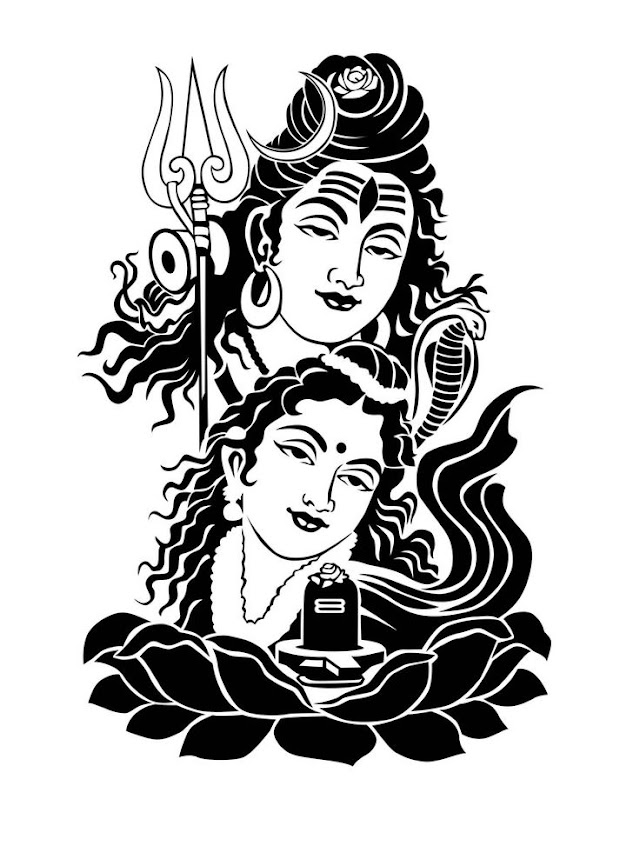
SHIV JI SKETCH IN PYTHON GRAPHICS | BHOLE BABA DRAWING IN PYTHON TURTLE GRAPHICS | LEARN PYTHON TURTLE GRAPHICS | SKETCH DRAWING IN PYTHON TURTLE GRAPHICS

 #___________ WELCOME ALL OF YOU ON COMPUTER SOFT SKILLS CHANEEL __________

#......................... PYTHON PROGRAM TO DRAW MAHADEV SKETCH  .........................


from sketchpy import canvas

from turtle import Screen

s=Screen()

s.bgcolor('yellow')


ab=canvas.sketch_from_svg("D:\\python\\mahadev.svg",scale=310)

ab.draw()

Mahadev sketch

FIRSTLY SAVE THIS IMAGE AND CONVERT THIS IMAGE INTO SVG FILE BY USING SVG CONVERTER.COM SITE.


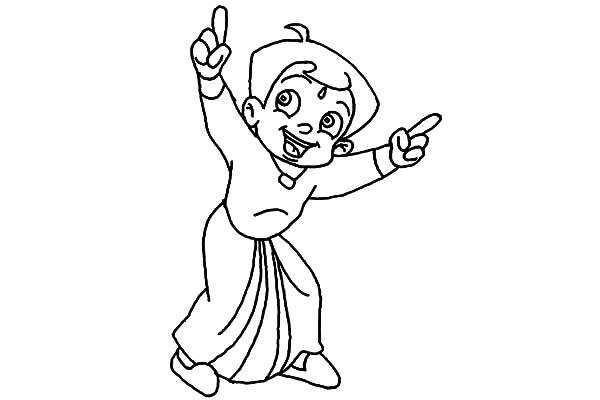
Chota Bheem sketch created using python turtle graphics | chota bheem drawing make by python graphics | python turtle graphics | Sketch programming in python

 #___________ WELCOME ALL OF YOU ON COMPUTER SOFT SKILLS CHANEEL __________

#......................... PYTHON PROGRAM TO DRAW CHOTA BHEEM SKETCH  .........................


from sketchpy import canvas

from turtle import Screen

s=Screen()

s.bgcolor('yellow')


ab=canvas.sketch_from_svg("D:\\python\\chotabheem.svg",scale=70)

ab.draw()


CHOTA BHEEM SKETCH

FIRSTLY THIS IMAGE CONVERT INTO SVG FILE BY SVG CONVERTER.COM SITE.


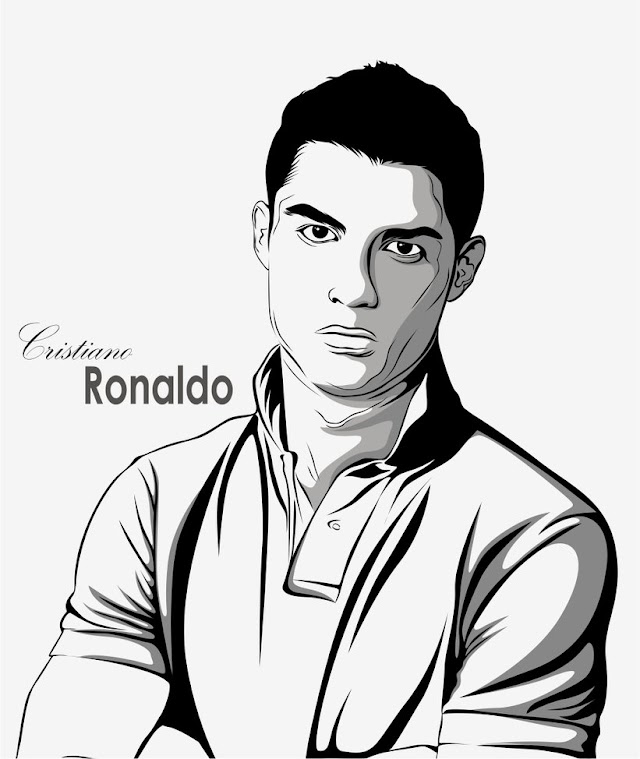
Cristiano Ronaldo Sketch Drawing using Python Turtle Graphics | Ronaldo sketch in Python graphics | learn python turtle graphics | Sketch Drawing in python canvas turtle graphics

 #___________ WELCOME ALL OF YOU ON COMPUTER SOFT SKILLS CHANEEL __________

#......................... PYTHON PROGRAM TO DRAW SKETCH OF RONALDO .........................


import turtle as tu

import cv2

from svgpathtools import svg2paths2

from svg.path import parse_path

from tqdm import tqdm

class sketch_from_svg:


    def __init__(self,path,scale=30,x_offset=400,y_offset=400):


        self.path = path

        self.x_offset = x_offset

        self.y_offset = y_offset

        self.scale = scale


    def hex_to_rgb(self,string):

        strlen = len(string)

        if string.startswith('#'):

            if strlen == 7:

                r = string[1:3]

                g = string[3:5]

                b = string[5:7]

            elif strlen == 4:

                r = string[1:2]*2

                g = string[2:3]*2

                b = string[3:4]*2

        elif strlen == 3:

                r = string[0:1]*2

                g = string[1:2]*2

                b = string[2:3]*2

        else:

            r = string[0:2]

            g = string[2:4]

            b = string[4:6]


        return int(r,16)/255,int(g,16)/255, int(b,16)/255  


    def load_svg(self):

        print('loading data')

        paths,attributes,svg_att = svg2paths2(self.path)

        h = svg_att["height"]

        w = svg_att['width']

        self.height = int(h[:h.find('.')])

        self.width = int(w[:w.find('.')])


        res = []

        for i in tqdm(attributes):

            path = parse_path(i['d'])

            co = i['fill']

            #print(co)


            col = self.hex_to_rgb(co)

            #print(col)


            n = len(list(path))+2       

            pts = [((int((p.real/self.width)*self.scale))-self.x_offset, (int((p.imag/self.height)*self.scale))-self.y_offset) for p in (path.point(i/n) for i in range(0,n+1))]

            res.append((pts,col))

            #res.append(pts)


        print('svg data loaded')

        return res


    def move_to(self,x, y):

        self.pen.up()

        self.pen.goto(x,y)

        self.pen.down()


    def draw(self,retain=True):

        coordinates = self.load_svg()

        self.pen = tu.Turtle()

        self.pen.speed(0)

        for path_col in coordinates:

            f = 1

            self.pen.color('black')


            #print(path_col)

            path = path_col[0]


            #print(path_col)

            col = path_col[1]


            #print(col)

            self.pen.color(col)

            self.pen.begin_fill()

            next = 0

            for coord in path:

           #for coord in path_col:

                x,y = coord

                y *= -1

           #print(x,y)

                if f:

                    self.move_to(x, y)

                    f=0

                else:

                    self.pen.goto(x,y)

            self.pen.end_fill()


        if retain == True:

            tu.done()

pen= sketch_from_svg('D:\\python\\ronaldo.svg',scale=380)

pen.draw()


#________________________ I HOPE YOU LIKE THIS PROGRAMMING _______________


#________________LIKE _________________SHARE _________________SUBSCRIBE ________________


Ronaldo Sketch 

THIS SKETCH CONVERT INTO SVG FILE USING SVG CONVERTER.COM SITE.


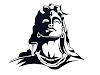
Bhole Baba sketch drawing in python | shiv ji drawing in python turtle graphics | Adiguru Shiv sketch drawing in python turtle graphics | learn python turtle graphics

 #___________ WELCOME ALL OF YOU ON COMPUTER SOFT SKILLS CHANEEL __________

#......................... PYTHON PROGRAM TO DRAW SKETCH OF LORD ADIYOGI .........................


import turtle

from sketchpy import canvas

turtle.bgcolor('CORAL')

wn = turtle.Screen()

wn.setup(width=1350, height=750)


t=turtle.Turtle()


t.penup()

t.goto(-50,10)

t.pendown()

t.color('Aqua')

style = ('Bradley Hand ITC',50,'bold')

t.write('"Shiva is not a God.', font=style, align='right',move=True)

t.hideturtle()


t.penup()

t.goto(-40,-80)

t.pendown()

t.color('Aqua')

style = ('Bradley Hand ITC',55,'bold')

t.color('Lime')

t.write('He is the Universe."', font=style, align='right',move=True)

t.hideturtle()


t.penup()

t.goto(-200,-350)

t.pendown()

t.color('Black')

style = ('courier',30,'italic')

t.write('COMPUTER SOFT SKILLS', font=style, align='right', move=True)

t.hideturtle()


t.penup()

t.goto(-350,-400)

t.pendown()

style = ('Bradley Hand ITC',40,'bold')

t.write('"-ROHIT-"', font=style, align='right',move=True)

t.hideturtle()


ab = canvas.sketch_from_svg("D:\\python\\adiyogi.svg",scale=25)

ab.draw()


#______________ I HOPE YOU LIKE THIS PROGRAMMING _______________


#________________LIKE _________________SHARE _________________SUBSCRIBE ________________


Adiguru Shiv Ji sketch.

Firstly convert this image into svg file format using svg converter.com site. 

how to write text in python turtle graphics | write text in python canvas | python text font style | learn python turtle graphics

 #___________ WELCOME ALL OF YOU ON COMPUTER SOFT SKILLS CHANEEL __________

#......................... PYTHON PROGRAM TO WRITE TEXT IN PYTHON  .........................


import turtle

turtle.bgcolor('deeppink')

wn = turtle.Screen()

wn.setup(width=1350, height=750)

t=turtle.Turtle()


t.penup()

t.goto(0,300)

t.pendown()

t.color('Aqua')

style = ('Bradley Hand ITC',45,'bold')

t.write('Coding like poetry should be short and concise.', font=style, align='center',move=True)

t.hideturtle()


t.penup()

t.goto(-40,-50)

t.pendown()

t.color('Aqua')

style = ('Braddon bold',25,'bold')

t.color('Lime')

t.write('First solve the problem. Then, write the code. ', font=style, align='right',move=True)

t.hideturtle()


t.penup()

t.goto(30,-200)

t.pendown()

t.color('Black')

style = ('verdana',30,'italic')

t.write('Confusion is part of programming.', font=style, align='left', move=True)

t.hideturtle()


t.penup()

t.goto(450,-350)

t.pendown()

t.color('yellow')

style = ('harrington',35,'normal')

t.write('Programming is learned by writing programs.', font=style, align='right',move=True)

t.hideturtle()


turtle.done()


#______________ I HOPE YOU LIKE THIS PROGRAMMING _______________


#________________LIKE _________________SHARE _________________SUBSCRIBE ________________


Featured Post

Happy Republic Day Wish Using HTML and CSS | 26 January wish using HTML/CSS

 Happy Republic Day Wish Using HTML and CSS, 26 January wish using HTML/CSS <!-- WELCOME ALL OF YOU ON COMPUTER SOFT SKILLS CHANNEL -----...

Popular Posts